
CPhI  China Pharma Connect
Online Matchmaking system
Guidance of Usage
Introduction to China Pharma Connect
Thank you for participating in CPhI & P-MEC China 2019! The brand-new online matchmaking system-China Pharma Connect will facilitate precise targeting and efficient matchmaking with 3,200+ exhibitors and 50,000+ visitors and help to maximize the business value of your participation.
Features of China Pharma Connect
Efficiently manage onsite meetings with exhibitors/visitors
- Send meeting requests in advance and establish contact with exhibitors/visitors before the exhibition
- Different time periods and meeting places to choose from
- An overall meeting timetable for easy management
- Automatic reminders via emails before the show
- One-on-one professional customer service to improve appointment efficiency
Precise Exhibitor/visitor targeting
- Filter target exhibitors by product category, country, etc.
- Filter target clients by interest area, business type, country, and job function, etc.
- Target exhibitors/visitors fast by keyword search (company name, product name, booth number, etc.)
Multi-devices support
- Devices include mobiles, tablets, laptops, and PCs etc.
- Online access directly, no need to download
Step by step guide on how to use China Pharma Connect
Step 1 Login to the system
Click the link below to login to China Pharma Connect system
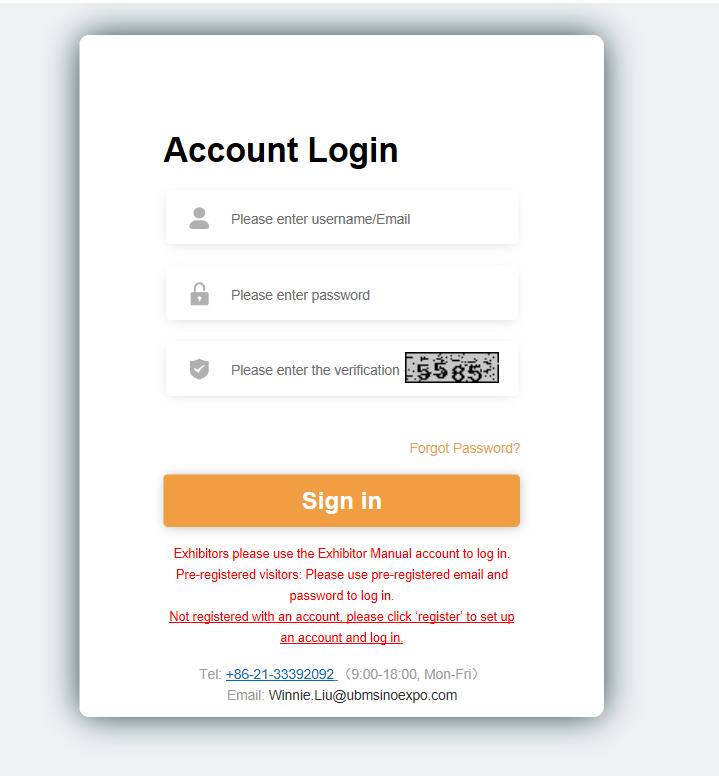
Exhibitor login: Exhibitors can log in by using the Online Exhibitor E-Manual username and password. Your account, password and login link to China Pharma Connect will be sent by email. Please save the email properly.
Visitor login: Visitors need to register in advance for CPhI & P-MEC China 2019 and will receive a matchmaking notification email within one week of the pre-registration. If you have not completed the pre-registration as a visitor yet, please click here to register for CPhI & P-MEC China 2019.
If you have any questions, please contact our dedicated customer service:
Telephone: +86-21-33392092, email: winnie.liu@ubmsinoexpo.com
Step 2 Complete Account Information
For exhibitors:
After logging in, exhibitors will be redirected to the account info interface, where they can:
- Modify email address
- Change login password
- Add sub-accounts (unlimited number sub-accounts can be added. Each sal...
Read More






























 (All Rights Reserved)